






Manufacturing ERP buyer's guide (2026)
This list of top manufacturing ERP software systems offers over 100 options for businesses. Here’s a look at some popular choices:
- SAP Business One helps small and medium-sized businesses to manage core business processes.
- Plex was developed specifically for manufacturing, delivering a unified, shop-floor-to-top-floor ERP solution.
- QAD Adaptive is a comprehensive, AI-powered solution supporting global manufacturing operations.
Every one of these systems looks like a winner. So, how do you choose between so many excellent possibilities?
Identifying your requirements for a manufacturing ERP
The starting point is understanding your business’s unique requirements. Ask yourself:
- What specific challenges is your current system failing to address?
- What features are needed to meet customer expectations?
- Are there processes you want to control better, but the tools you have now are insufficient?
- Do you want to re-engineer some processes but feel your software won’t support what you have in mind?
These are enterprise-level questions, so gather people from all departments to answer them. Make sure everyone understands what these systems do and what to expect from them.
Have each team list its specific needs; the production team's needs might differ from those of the sales team. At this point, all ideas are welcome.
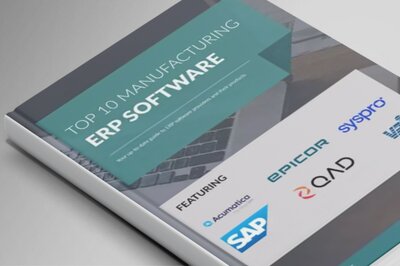
Recommended download: Top 10 manufacturing ERP guide (2026)
Review the list and see where needs overlap. You might find that a request from one department could also benefit another. This is a company-wide effort, so focus on changes that will help the entire business, not just one team.
Finally, share this revised list with employees who weren't in the initial meetings. Their feedback is valuable, as they will be using the new system. You might find that some needs are less important than you thought, while new, important ones emerge.
“Must-haves” vs. “nice-to-haves”
Once you have your refined requirements list, it's time to rank them. Start by identifying your top priorities (the features without which the ERP system would fail to meet your core business needs). These are your "must-haves."
Next, list your "nice-to-have" features, which are valuable but not essential. Any ERP system that doesn't meet all of your must-have requirements can be eliminated. This process will help you narrow down the pool of ERP options to those that best align with your business needs.
Top features to look for in a manufacturing ERP
- Modular design: Many manufacturing ERP systems are sold in individual modules. This allows a business to choose only those modules that they need to meet their requirements; discrete manufacturers can focus on discrete manufacturing modules rather than paying for unnecessary process modules.
- Real-time data: Manufacturing ERP systems are made of many linked databases. When a purchase order is received at the back dock, all the related systems are immediately updated. The inventory of the received component is incremented. Accounts payable toward the supplier are adjusted. Production orders that require that component can now be released into production and the required resources can be scheduled. Throughout the system, users can query the records and get information that is automatically up to date.
- CRM: Integrated manufacturing ERPs connect outside the business as well as provide an internal real-time view. A CRM module tracks open quotes, those completed as sales orders, or even where the order was lost. Any lost quotes get reason codes so they can be analyzed for future improvements. Which customers are more profitable? Which customers are easiest to deal with? CRM has the answers to these and many more of your business’s questions.
- GAAP compliance: Manufacturing ERP systems must comply with Generally Accepted Accounting Principles (GAAP) and local regulations. The right ERP ensures financial data is aligned with accounting standards, easing regulatory compliance.
- Work in Progress tracking: Manufacturers have component inventory and finished goods inventory. These are similar to retail inventory in that each item is a discrete unit. Manufacturers also have production somewhere in between too. Some of the components have been used to make that finished item. Some of the labor needed has been spent too, but at any moment, there is inventory in progress and manufacturing ERP systems provide the value of that inventory.
- Manufacturing operations management: Each finished product has a list of components that will be used, and a specific flow of operations will yield that finished product. Discrete manufacturers have a bill of materials and process manufacturers might use a recipe. Our discrete manufacturer details the flow in routing and our process manufacturer uses the recipe to detail the steps required to assemble, mix, or bake their product. These features are an essential part of any ERP for a manufacturer.
- Business Intelligence: Manufacturers make decisions every day at every level within the organization. BI supports those decisions. Decision-makers need up-to-date information, whether choosing to build a factory or accept a customer order. Standard reports meet some needs, but dashboards often offer better, tailored support with features like color codes like “red” for urgent action and “yellow” for caution. Business intelligence also enables unique, one-time reports for special decisions, making these features valuable for manufacturers and other businesses.
How much should you budget?
The cost of manufacturing ERP systems can vary from free, open-source solutions to multimillion-dollar enterprise systems. Keep in mind that initial setup costs are just one part of the investment. Ongoing costs, including maintenance, training, and upgrades, are crucial to budget for as well.
Open-source ERPs might offer free initial access but require in-house expertise for support and customization. Alternatively, cloud-based ERP solutions, often billed monthly, provide lower upfront costs and include security, updates, and support in the subscription.
When budgeting, weigh the initial investment against the total cost of ownership, which includes support, hardware, and personnel required to maintain the ERP system.
Selecting the best manufacturing ERP in 2026
Among the top manufacturing ERP systems are industry leaders like SAP, Oracle, and Microsoft. Each offers comprehensive features, but the best choice will depend on your unique requirements. For smaller manufacturers, solutions like Dynamics 365 Business Central provide affordable, scalable ERP options tailored to growth.
To select the best ERP for your manufacturing business
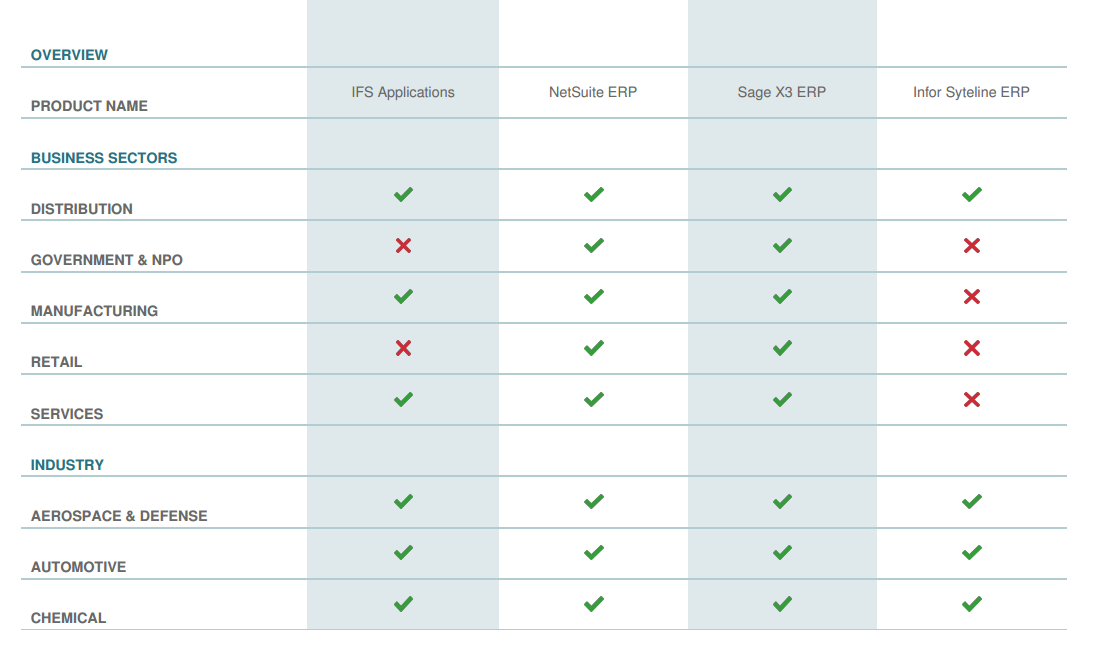
- Build your initial manufacturing software shortlist using our comparison engine
- Review product features listed on vendor sites and explore reviews for user insights.
- Read ERP analyses in trade journals.
- Request demonstrations from vendors of your top choices to see the software in action.
The ERP selection process is iterative but valuable. By gathering insights across departments and consulting industry peers, you’ll find an ERP solution tailored to your manufacturing needs.
Good luck with your selection!