


Deltek Costpoint is an ERP for organizations that manage government contracts and project-based work. It combines financial management, project accounting, compliance tools, and operational reporting.
It manages the full lifecycle of government contracts from opportunity tracking and project setup to cost reporting and contract closeout.
Costpoint is built around the regulatory and accounting requirements common in government contracting, including audit readiness and complex cost allocation rules.
The system is typically used by government contractors, aerospace and defence suppliers, consulting firms, and professional services organisations that operate under strict compliance frameworks.
Costpoint brings financial data, project tracking, and contract administration into a single system. Teams use it to track costs, manage labor, monitor project performance, and generate reports required for audits and compliance.
The platform focuses heavily on project-based accounting. It helps organisations track direct and indirect costs, manage billing rules tied to contract types, and maintain documentation needed for regulatory reviews.
Organizations implement Costpoint when general accounting software can’t handle the reporting, compliance, and cost tracking requirements associated with government contracts.
Project accounting: Organizations can track labour, materials, and indirect costs against individual contracts or projects. The system supports multiple contract structures such as fixed-price, time-and-materials, and cost-plus agreements. This flexibility helps teams monitor profitability and compliance across different government contract types.
Financial management: Costpoint includes a full financial management suite with tools for general ledger, accounts payable, accounts receivable, and budgeting. Finance teams use these modules to maintain detailed financial records and connect accounting data with project activity. This approach allows organizations to link project performance with financial reporting.
Compliance and audit support: Government contractors often face strict regulatory requirements. Costpoint incorporates compliance features designed to help organisations meet standards such as those associated with defence and federal contracting; the system includes DCAA-aligned timekeeping, cost segregation, and reporting capabilities to help maintain audit-ready records.
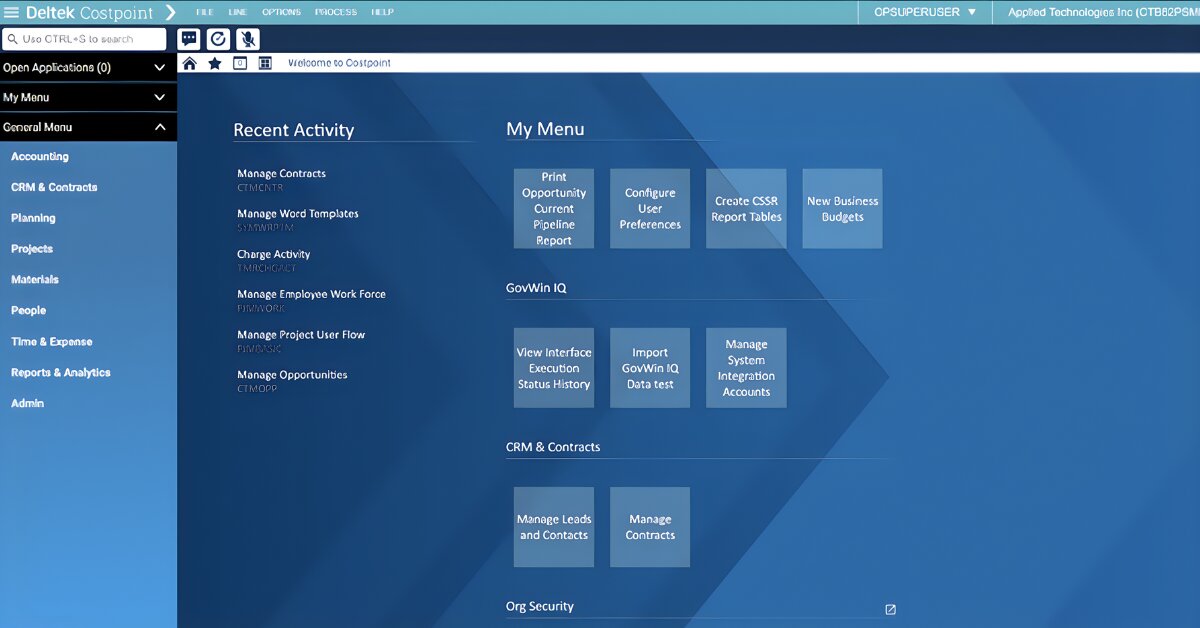
Contract and project management: Costpoint provides tools to manage the operational side of contracts, including project setup, labour planning, and contract performance monitoring. Managers can track budgets, monitor contract progress, and review project financials through dashboards and reports.
Analytics and reporting: The platform includes reporting tools that give teams insight into project performance, financial metrics, and contract status. Recent updates introduced role-based dashboards and analytics workspaces designed to surface operational data for different teams.
Costpoint includes a Time and Expense module that helps organisations track employee labour and project-related expenses.
Employees can log working hours, review previous time entries, and submit expense reports. Supervisors can review and approve submissions before they move into payroll or project accounting workflows.
The Time and Expense app allows employees to complete tasks like:
The app synchronizes with the main Costpoint system and focuses specifically on the time-tracking and expense components of the platform.
Organisations can deploy Costpoint in several ways:

Download exclusive feature and pricing data with your free extended profile of Deltek Costpoint .
DownloadUpdate the Deltek Costpoint profile with your latest feature, screenshots and pricing to reach more buyers. Click the link below to get started.
Update this profile
How much does an ERP system cost in 2025? Everything you need to make an ERP software budget

Learn how Godlan ensures successful ERP implementation for manufacturers with proven strategies &...
All you need to know construct a foolproof ERP RFP, including a customizable template
Pricing Guide

Download your pricing guide by completing the form below.
Price Quote
Complete the form below to access a video demo of this software.
Other Users often Compare these Four Solutions

Download your bespoke report in a single pdf.
Extended Software Profile
Get your extended software profile by completing the form below.
Extended Software Profile